
Summary
- Unlocking Gear Remote Management
- How Gear Remote Management works
- Gear Remote Management button
- Gear Usage Alert
- The Three Numbers | ACT, EFF, HLT
- Control Relay
- Tips
⚙️ Gear Remote Management — your whole fleet, one screen
Gear Remote Management is a small computer that keeps an eye on every piece of Production Gear you have in the Factories. From one screen you can see what’s running, what’s idle and why, switch any Gear’s automation ON or OFF, and read three honest numbers about how well your operation is really doing.
Unlocking Gear Remote Management
To Control the Gear in your Factories Area you first have to buy the Junkyard, clean and repair it, then hire Sarah to build the underground Conveyor Belt.
If you haven’t done this you can find a guide HERE.
At first, you’ll get a pop-up window informing you of the possibility to control the Gear in your Factories Area from your main farm.
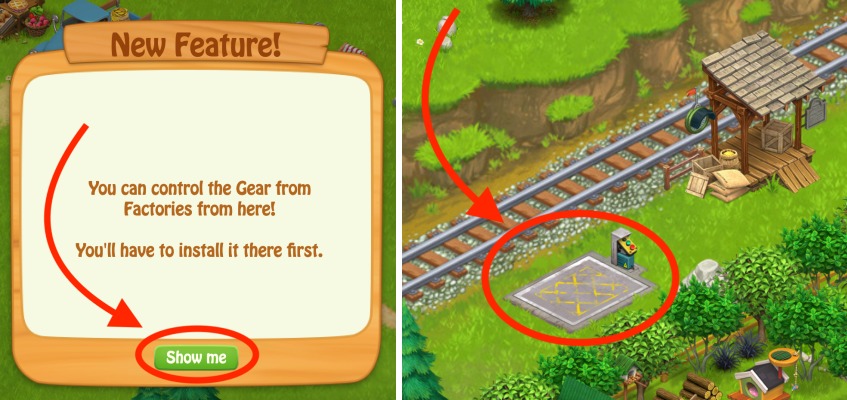
Locate the Conveyor Belt Ramp next to the Train Station, click it, then take Joe to the Factories Area.
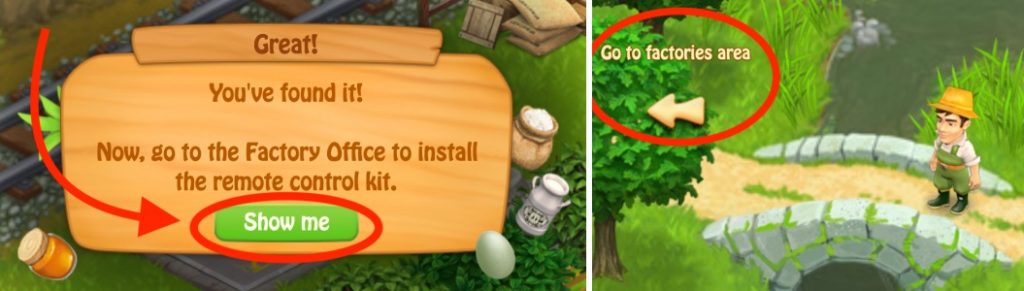
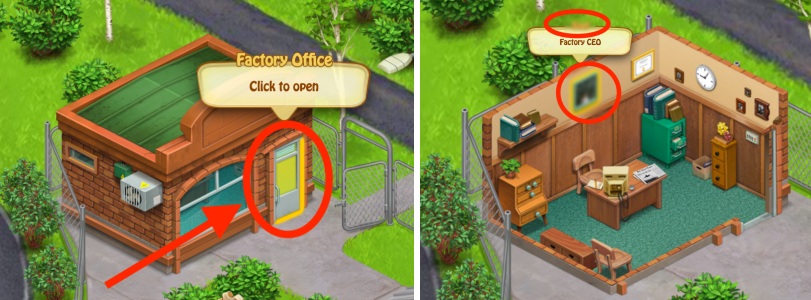
Click the door of the Factories Office to open it and check who’s CEO 🙂
Click on the desk in the office to buy a Remote Control Kit and install it.
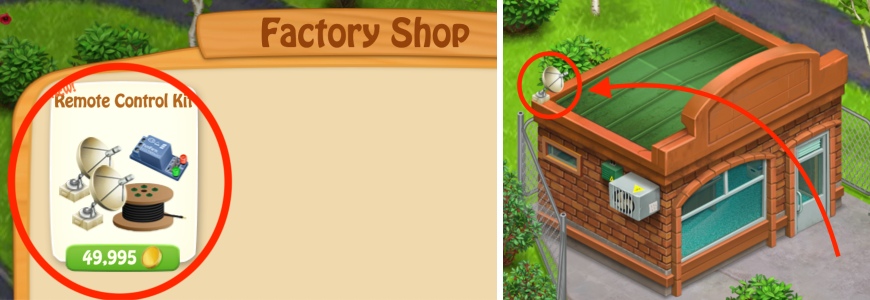
Now you’re able to control the gear in your Factories Area from your farm.
How Gear Remote Management Works
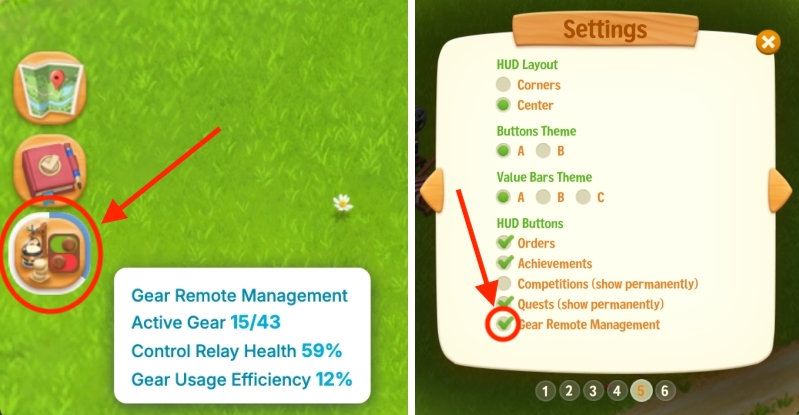
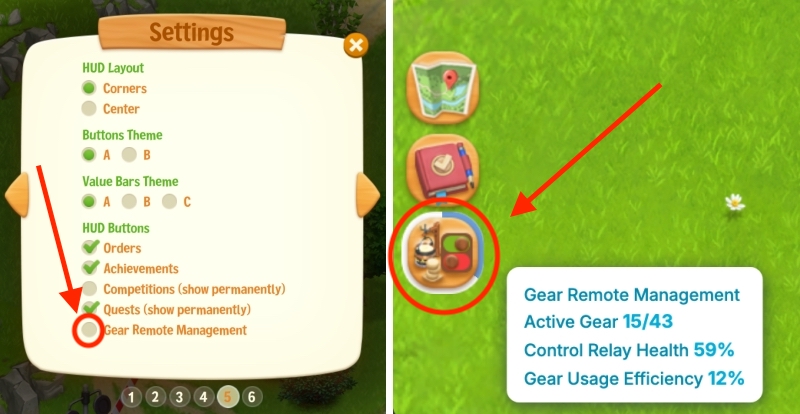
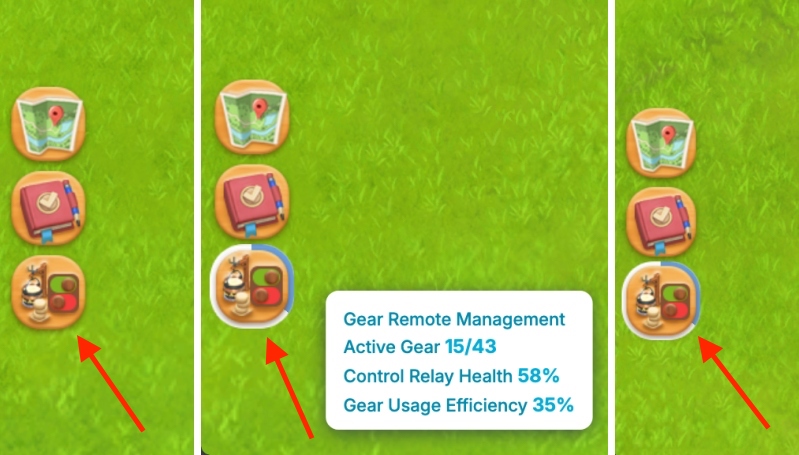
To open Gear Remote Management, click the button at the bottom-left side of your game. You can enable or disable the button in Settings > Page 5.
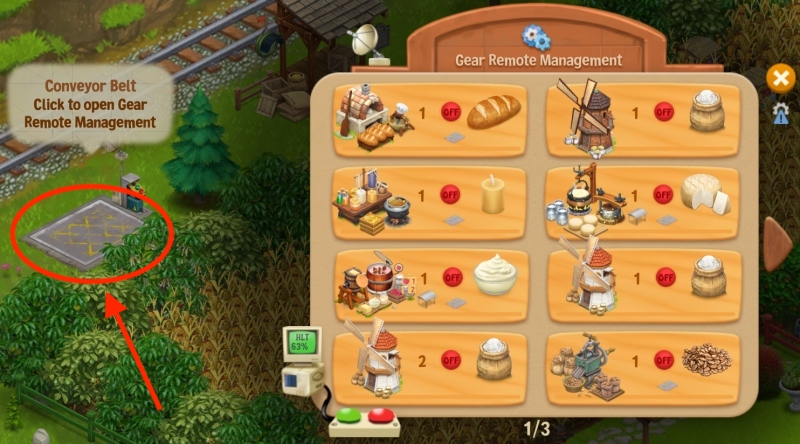
Alternatively, click the Conveyor Belt Ramp next to the Train Station to check your Gear Remote Management menu. There you will find all the Gear that’s in your Factories Area.
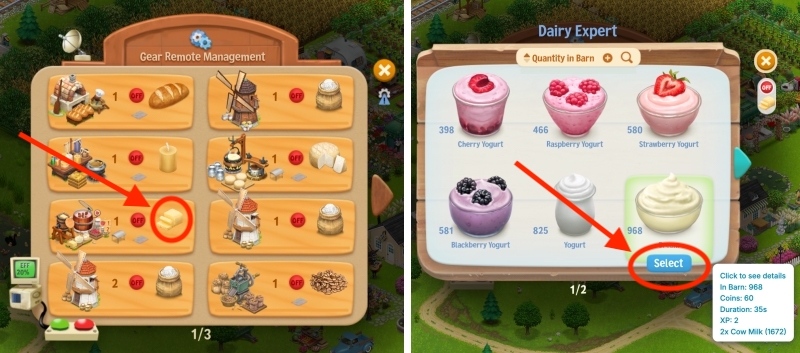
To change a product, click on it — let’s take Butter as an example. Click the icon for Butter, then select Cream, just like you would change it if you used your Dairy Expert normally.
Then, turn Automation ON. That’s it!
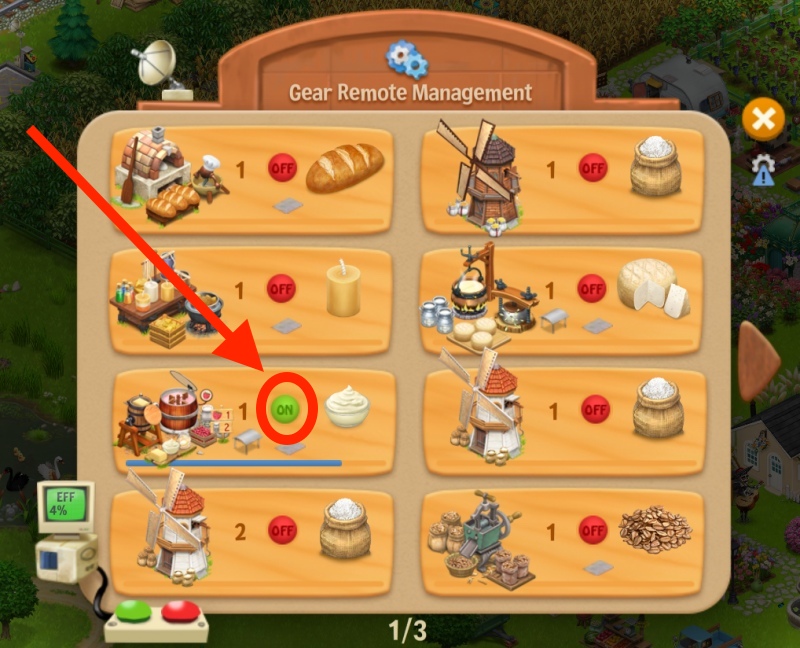
Each Gear shows what it is working on and how far along it is — and when a Gear sits idle, the button tells you why.
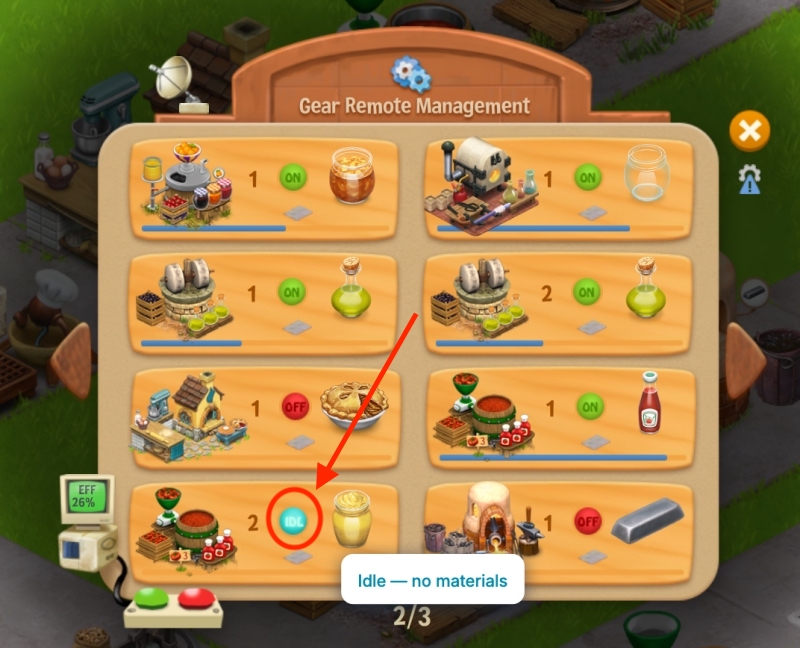
You can also see the ON/OFF buttons and a blue progress bar.
Of course, you can also go ballistic and turn ON all automation for your Gear fleet in the Factories :). Preparing for a big production push, or shutting things down for the night, is now one click away.
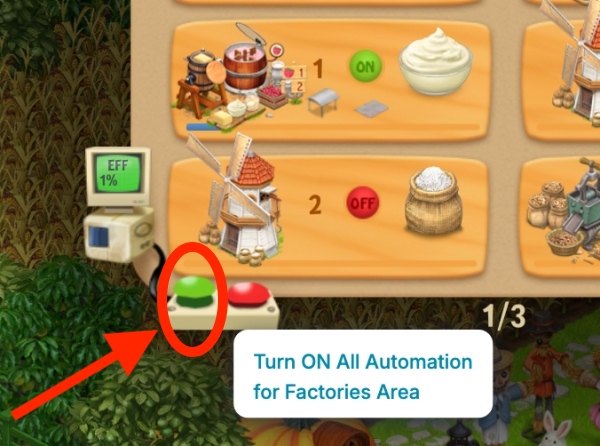
Gear Remote Management button
You’ll find the Gear Remote Management button on your HUD (bottom-left side of your game), which also carries a little gauge so your farm’s efficiency is visible at a glance.
If you prefer a cleaner HUD, you can turn the button on or off from Settings > Page 5 > HUD Buttons.
Gear Usage Alert
The gauge comes with its own Gear Usage Alert, tucked under the popup’s close button. To open it, click the icon with some gears and a blue triangle with an exclamation mark.
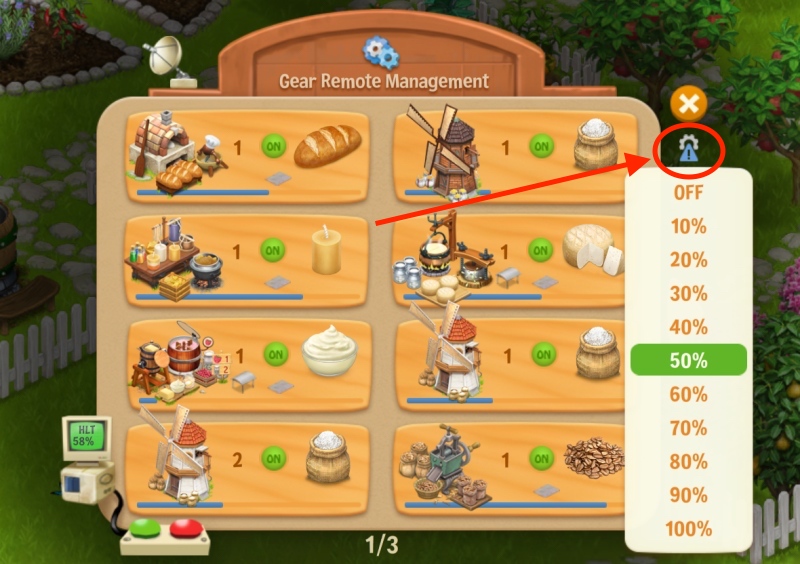
Pick a level, and the HUD Gear gauge stays open as a reminder while your Gear Usage sits below it — so a slumping fleet gets noticed before you’d spot it yourself.
In the example above we chose 50%, but since the Gear Usage Efficiency is only 35% (Active Gear only 15/43 ), the gauge will stay open to warn you.
Features
- One screen for all Gear in Factories — see, and switch, all your Production Gear from wherever you are, whether it’s your Farm or the Factories.
- A HUD button with a live gauge — your fleet’s efficiency before you even open the screen; turn the button on or off from Settings > Page 5 > Gear Remote Management.
- Remote automation — a switch on every Gear’s card, plus master switches for the whole fleet at once.
- Idle tooltips — hover an idle Gear’s card, or its Automation button out in the world, and a tooltip tells you exactly why it’s sitting dark.
- Load bars & placement info — every Gear in the Factories shows its own load bar, and whether it’s placed on Concrete Tiles or under a roof.
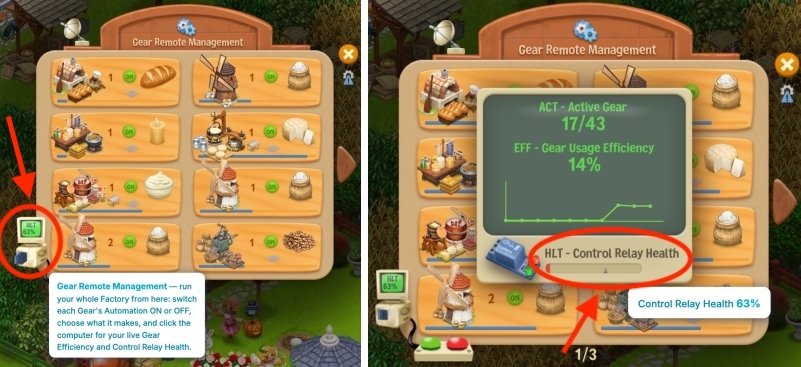
- Three numbers on the monitor — ACT (running right now), EFF (efficiency over time), HLT (Control Relay health) show intermittently.
- Gear Usage Alert — the HUD gauge stays open as a reminder while your Gear Usage is below the level you pick.
The three numbers on the monitor | ACT, EFF, HLT
ACT · Active GearEFF · EfficiencyHLT · Controller Health
- ACT — Active Gear. How many of your placed Gear are running right now, counted across both the Farm and the Factories. Placed but sitting dark? It shows here.
- EFF — Gear Usage Efficiency. The percentage of your fleet that’s actually been working over the last hour or so. This is the number for the optimizers among you: keeping every Gear fed and running is a genuine skill, and EFF is its scoreboard.
- HLT — Controller Health. The health of the computer’s own Control Relay (more on that below).
Control Relay — The one part that wears out
The computer does its remote work through a Control Relay — and like any hard-working part, it wears down over time. Its health is the HLT number on the monitor, and the computer even keeps a lifespan chart so you can watch it age (we find this oddly soothing).
When the relay runs low, replace it and the computer is as good as new. A worn relay never breaks your Gear — it only dims your remote control — so this is upkeep, not jeopardy.
⚙️ Running a tight ship | Tips
- Watch EFF, not just ACT. Ten Gear placed and three running is a 30% operation — the efficiency number tells you the truth over time.
- Idle cards tell you what to fix — restock materials or queue up products directly from the menu.
- The master switch is your friend before you step away — an idle Gear wastes nothing when it’s deliberately off.
- Set the Gear Usage Alert. Pick the level that should worry you, and the HUD gauge stays open as a reminder whenever you drop below it.
- Keep an eye on the Relay. A healthy Control Relay keeps the whole remote operation crisp.
Gear Remote Management is for the farmers who love the systems side of Country Life Meadows — the production chains, the throughput, the quiet satisfaction of a fleet running at full song. If that’s your kind of farming, the computer is waiting.