
Keep your Farm organized and make the most of your space by storing, moving, and rotating items. You can use the Add to Warehouse Tool to store Gear or Decorations you don’t currently need, or move and rotate items to create the perfect layout for your Farm.
Add to Warehouse
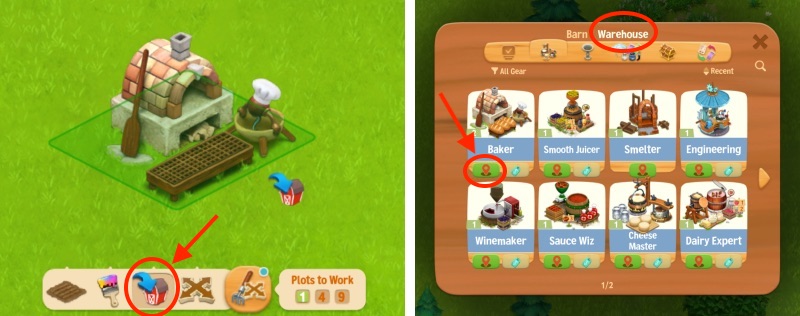
Use the Add to Warehouse Tool to store Gear, Decorations, and other items.
- Open your Tools (rake and move icon), then select Add to Warehouse.
- Click the item you want to store.
- To view your stored items, click the Barn button and select the Warehouse tab.
- To return an item to your Farm, click Place under the item and place it in an empty area.
Move
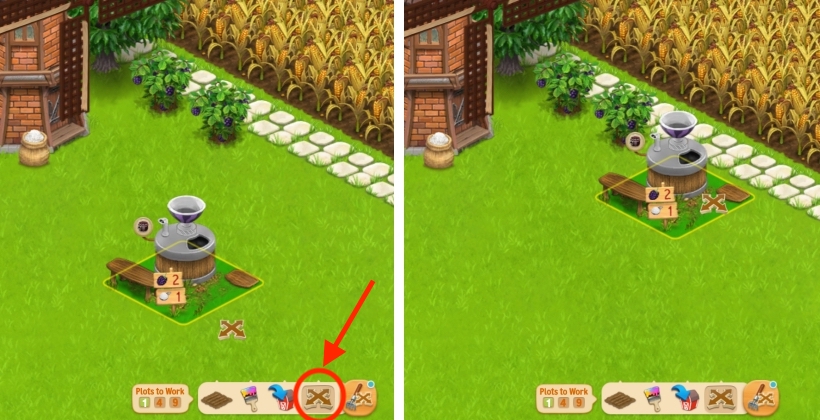
To move something, click your Tools button, select the Move Tool, then click on the object.
Rotate
- To rotate something, click your Tools button, hover with your mouse over the Move Tool, then select the Rotate Tool. Then, click on the object you want to rotate. Please note that some objects can’t be rotated.
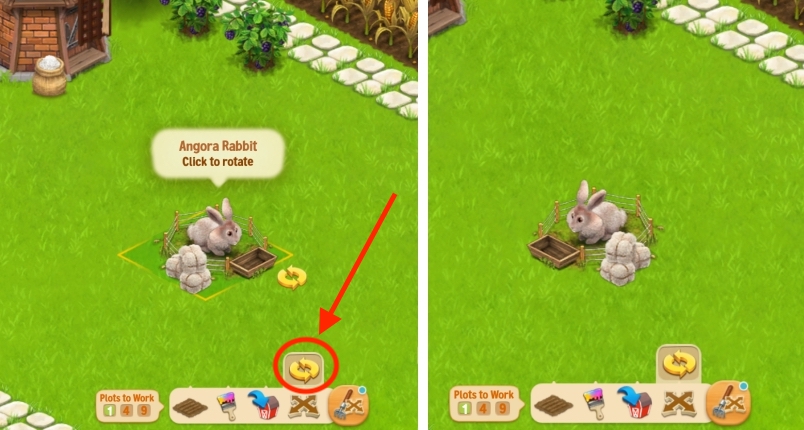
2. You can also rotate an object by selecting it with the Move Tool and pressing the Space bar on your keyboard (so, when it’s not placed yet).